
The Expert Guide to OLED Modding and Chip Installation
What Is an OLED Mod and Why It Transforms Your Gaming Experience
The OLED mod expert guide you’ve been looking for is right here — whether you’re modding a Nintendo Switch OLED, a Switch Lite, or another handheld, this guide covers everything from chip installation to software setup.
Quick answer for common OLED mod goals:
- Install a modchip (Picofly) on Switch OLED → Use the DAT0 adapter method (beginner) or the Kamikaze method (advanced)
- Upgrade your Switch Lite screen → The SUPER5 kit adds a 600-nit OLED display with no soldering required
- Go online safely after modding → Run homebrew on EmuNAND, keep sysNAND clean for Nintendo online
- Fix a failed install → Check for shorts on MAX77801, MAX77182, or MAX77620H ICs using resistance mode on your multimeter
- Avoid a Nintendo ban → Never install NSP files or use Tinfoil on your main sysNAND
Gaming handhelds have come a long way. But stock displays? They often haven’t kept up.
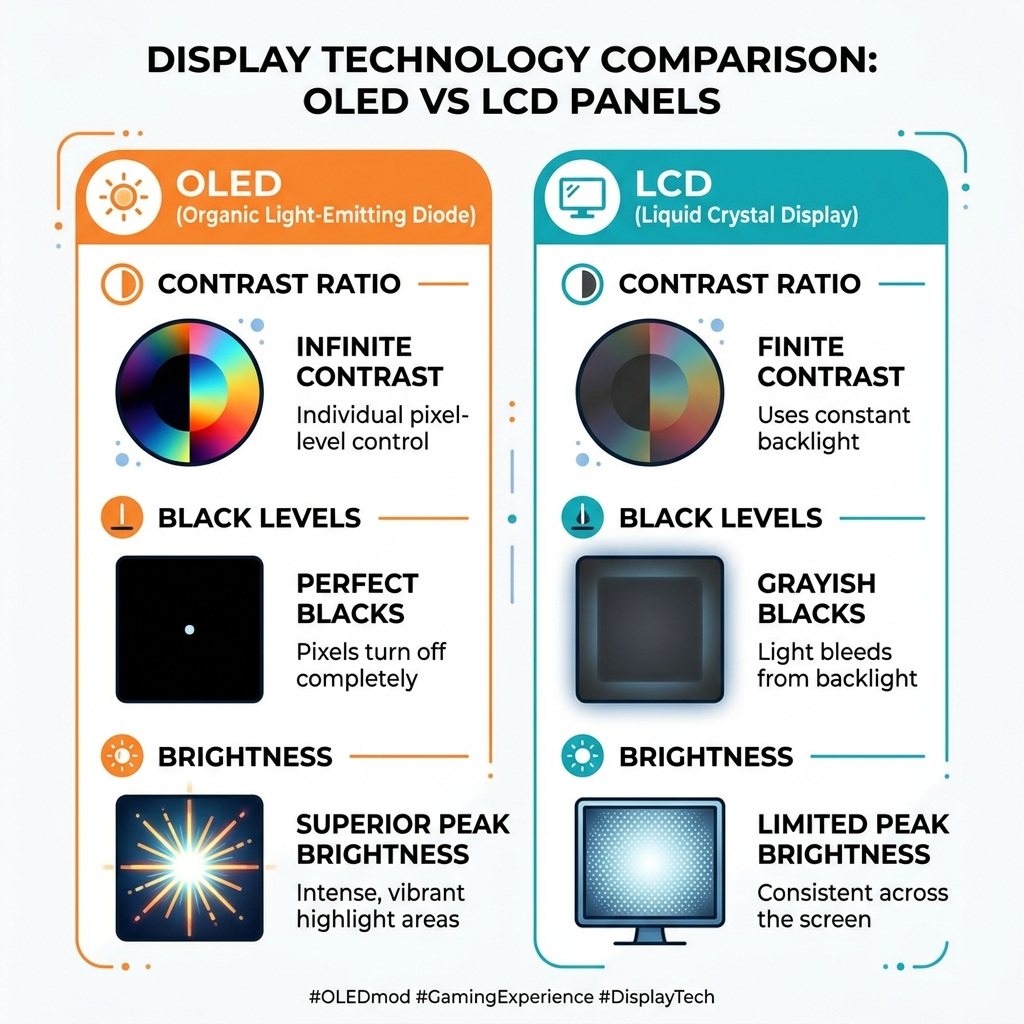
OLED panels offer deeper blacks, richer colors, and far better contrast than the LCD screens that ship in most classic and mid-gen handhelds. For retro gaming fans who want the best possible visual experience, an OLED mod is one of the highest-impact upgrades you can make.
The catch? Some of these mods are genuinely complex. The Kamikaze method for Switch OLED modchip installation — which involves grinding through PCB layers to expose a hidden data line — took one inexperienced modder around 15 hours to complete. And that’s before accounting for the risk of damaging critical power management chips.
But not every OLED mod is that intense. The SUPER5 kit for the Switch Lite, for example, snaps in without soldering and delivers a display that’s actually brighter and more vibrant than the official Nintendo Switch OLED screen.
This guide breaks it all down — tools, methods, troubleshooting, software safety, and where to source parts — so you can mod with confidence at whatever skill level you’re starting from.
Mastering the OLED Mod Expert Guide: Hardware and Tools
Before we dive into the “how,” we need to talk about the “with what.” Modding an OLED console isn’t like swapping batteries in a remote; it requires precision. If you are new to this, we highly recommend you learn the basics of modding before touching a high-value console like the Switch OLED.
The Essential Toolkit
To achieve a professional-grade installation, your workbench should look like a miniature laboratory.
- Microsoldering Station: You need a temperature-controlled iron with a very fine tip.
- Wire Selection: For most connections, 30-32 AWG silver-plated wire is standard. However, if you’re attempting the advanced Kamikaze method, you’ll need 32-36 AWG enameled wire to fit into tiny drilled holes.
- Digital Microscope: You cannot do this with the naked eye. A digital microscope allows you to see solder bridges that are thinner than a human hair.
- Multimeter: This is your most important diagnostic tool. You’ll use it in Diode Mode to check for proper connections and Resistance (Ohms) Mode to find shorts. Expert tip: Diode mode readings can vary by console, so resistance testing is often more reliable for finding faults.
- Consumables: Use high-quality flux (it’s the “secret sauce” of clean joints) and leaded solder, which flows better than lead-free alternatives. A fume extractor is also essential for your health.
If you are specifically interested in the display side of things, check out our more info about screen modding for beginners to understand how ribbon cables and connectors work.
The Kamikaze Method vs. DAT0 Adapters for Switch OLED
When modding a Switch OLED with a chip like the Picofly (RP2040), the biggest hurdle is accessing the DAT0 line. Nintendo cleverly hid this point under the eMMC chip to prevent easy modding.

There are two primary ways to tackle this:
- The DAT0 Adapter: A thin flex cable that you slide underneath the eMMC chip. It relies on a friction fit against a solder ball. While easier for DIYers, these can fail over time. Heat cycles cause the flex cable to warp, and oxidation on the solder ball can eventually break the connection.
- The Kamikaze Method: This is the “permanent” fix. It involves grinding or drilling through two layers of the motherboard’s PCB to expose the DAT0 trace directly. Once exposed, you solder a wire directly to it.
| Feature | DAT0 Adapter | Kamikaze Method |
|---|---|---|
| Difficulty | Moderate | Extreme |
| Risk | Low (Reversible) | High (Permanent Damage) |
| Reliability | May fail over time | Permanent connection |
| Time | 1-2 hours | 5-15 hours |
Step-by-Step Requirements for the Kamikaze OLED Mod Expert Guide
If you’ve decided the DAT0 adapter isn’t for you, the Kamikaze method requires nerves of steel. You aren’t just soldering; you’re performing surgery on the PCB.
- Drilling/Grinding: You must carefully remove the top layers of the PCB in a very specific, trace-free area near the eMMC. The goal is to reach the second layer where the DAT0 via resides.
- Trace Exposure: Once you see the copper, you stop. You then use 36 AWG enameled wire to make the connection.
- Securing the Joint: Because this wire is so thin, you must use UV solder mask to “glue” the wire in place. This prevents the joint from snapping when you move the console.
- Chip Integration: This wire then connects to your RP2040-based modchip (like the Picofly), along with the SoC ribbon cable that attaches to the capacitors around the CPU.
For those looking to apply these skills elsewhere, we offer an OLED mod installation for retro consoles guide that explores how similar techniques are used on older hardware.
Troubleshooting and Repairing Common Installation Failures
Even experts have bad days. If your console doesn’t boot or the modchip flashes yellow, don’t panic. Most failures occur because of tiny solder bridges or damaged components.
Common Short Circuits
If your Switch is “dead” after a mod attempt, check the following Power Management ICs (PMICs):
- MAX77801: This chip is extremely sensitive. A solder blob bridging a nearby capacitor to ground can cause this chip to smoke or fail.
- MAX77182 and MAX77620H: These often show shorts if the 3.3V line or the SoC ribbon cable isn’t installed perfectly.
The ‘Failed to init EmuMMC’ Error
This is a common software-side error that usually points back to a hardware issue with the DAT0 connection. If the modchip can’t “see” the eMMC chip properly, it can’t initialize the emulated NAND. You may need to reseat your DAT0 adapter or re-check your Kamikaze solder joint.
Physical Repairs
Sometimes, an inductor might get knocked off or damaged by heat. When replacing them, look for parts with low DC resistance (around 13mΩ is standard, though 7mΩ can sometimes be an upgrade). If you’ve practiced on simpler projects like a guide to PSP screen replacement, you’ll have a much better feel for how much heat these components can take.
Advanced OLED Upgrades for Switch Lite and Wii U
While the Switch OLED comes with a great screen, other handhelds are being left in the dark. Fortunately, the modding community has stepped up.
The SUPER5 Kit for Switch Lite
This is a game-changer. The SUPER5 OLED mod provides:
- 600 nits brightness (compared to 340 nits on the standard Switch OLED).
- 150% sRGB coverage for incredibly vivid colors.
- 600,000:1 contrast ratio for perfect blacks.
The best part? It requires no soldering. It’s a drop-in replacement that transforms the Lite into arguably the best-looking handheld in Nintendo’s lineup.
The Wii U Gamepad OLED Project
Modders are also targeting the Wii U Gamepad. The goal is to replace the original 854×480 LCD with a modern OLED. This is significantly harder than a Switch mod because it requires an FPGA (Field Programmable Gate Array) to transcode the video signal and handle non-integer scaling.
If you’re interested in how these display technologies have evolved, our Game Boy Advance screen mod tutorial and guide on installing IPS display on Game Boy show just how far we’ve come from the original reflective screens.
Sourcing Parts for Your OLED Mod Expert Guide Project
Finding the right parts is half the battle.
- ICs and Inductors: Use reputable suppliers like Mouser Electronics or Digi-Key to ensure you aren’t getting counterfeit chips.
- OLED Panels and Modchips: AliExpress is the go-to for Picofly chips and SUPER5 kits, but always check seller ratings.
- Specialty Items: If you are working on older handhelds, we have specific tips in our step-by-step PSP screen replacement and Game Boy Color screen replacement tips articles.
Software Setup and Online Safety for Modded Consoles
Once the hardware is installed, you need to set up your software environment. The golden rule of modding is NAND Separation.
- SysNAND (System NAND): This is your console’s original internal memory. Keep this “clean.” Only use it for legitimate games and official Nintendo online play.
- EmuNAND (Emulated NAND): This is a copy of your system software stored on your SD card. This is where you run Atmosphere, Hekate, and homebrew apps like Tinfoil.
Avoiding the Ban Hammer
Nintendo’s servers can detect if your NAND has been modified. To stay safe:
- Never go online on EmuNAND without DNS blocking (like 90DNS or Exosphere) to hide your console’s serial number from Nintendo.
- Don’t install NSP files on your SysNAND. These are “dirty” files that leave traces Nintendo can see.
- Configure hekate_ipl.ini correctly to ensure you are booting into the right environment.
If you’re having trouble with visibility, you can use certain screen brightness adjustment hacks within the software to fine-tune your new OLED’s performance.
Frequently Asked Questions about OLED Modding
Is the Kamikaze Method safe for beginners?
Absolutely not. We consider this an “Expert Only” mod. It requires high-level microsoldering skills and the right equipment. Without a microscope and a steady hand, you are very likely to destroy the motherboard. For beginners, we recommend starting with a backlight mod for original Game Boy to practice basic soldering before moving to modern consoles.
How do I avoid a Nintendo ban after modding?
The most effective way is to keep your EmuNAND completely offline or use a dedicated DNS that blocks Nintendo’s servers. Always use your clean SysNAND for any official eShop purchases or online multiplayer. For more on safe installations, see our guide on backlight installation for Game Boy Pocket.
Can I upgrade a Switch Lite to 1080p OLED?
While 1080p OLED mods have been achieved by expert modders like Taki Udon, most commercial kits (like SUPER5) stick to the native 720p resolution. A 1080p screen on a 5.5-inch display looks incredible, but it requires complex FPGA scaling and can significantly increase power consumption, leading to shorter battery life.
Conclusion
Modding an OLED console is the ultimate way to preserve and enhance your gaming hardware. From the “do-or-die” precision of the Kamikaze method to the elegant simplicity of the SUPER5 Lite kit, there is a path forward for every enthusiast.
At Ganhos Reais, we believe in empowering the community with the knowledge to keep classic and modern handhelds alive. Whether you’re troubleshooting a short on a MAX77801 or setting up your first EmuNAND, patience is your best tool.
Ready to take the next step? Explore more screen mods and join the ranks of expert modders today!
