
The Best NES OLED Screen Upgrades and Modchips
Why Every Retro NES Fan Is Talking About the OLED Mod Right Now
This nes oled mod guide covers everything you need to upgrade your classic Nintendo Entertainment System with a modern OLED display — from sourcing parts to soldering and setup.
Quick answer at a glance:
- What it is – Adding a small OLED screen to your NES to show real-time game data, power status, or achievements
- Skill level – Intermediate (soldering experience required)
- Core parts – OLED module (e.g., SSD1306), microcontroller, 30AWG wire, soldering iron
- Estimated cost – Starting around $30-50 USD for basic builds
- Time to complete – 2-5 hours depending on experience
- Is it reversible? – Yes, with care during installation
The NES launched in 1985 and changed gaming forever. But its aging hardware was never designed for modern screens or smart features. Today, retro enthusiasts are pushing that hardware further than Nintendo ever imagined — adding tiny OLED panels that display live game info, power indicators, and even RetroAchievements data, all without gutting the console’s original charm.
The results are genuinely impressive. A small OLED tucked cleanly into the NES shell looks like it always belonged there. But getting from unboxing your components to a working mod takes real planning, the right tools, and a clear step-by-step process.
That is exactly what this guide gives you.
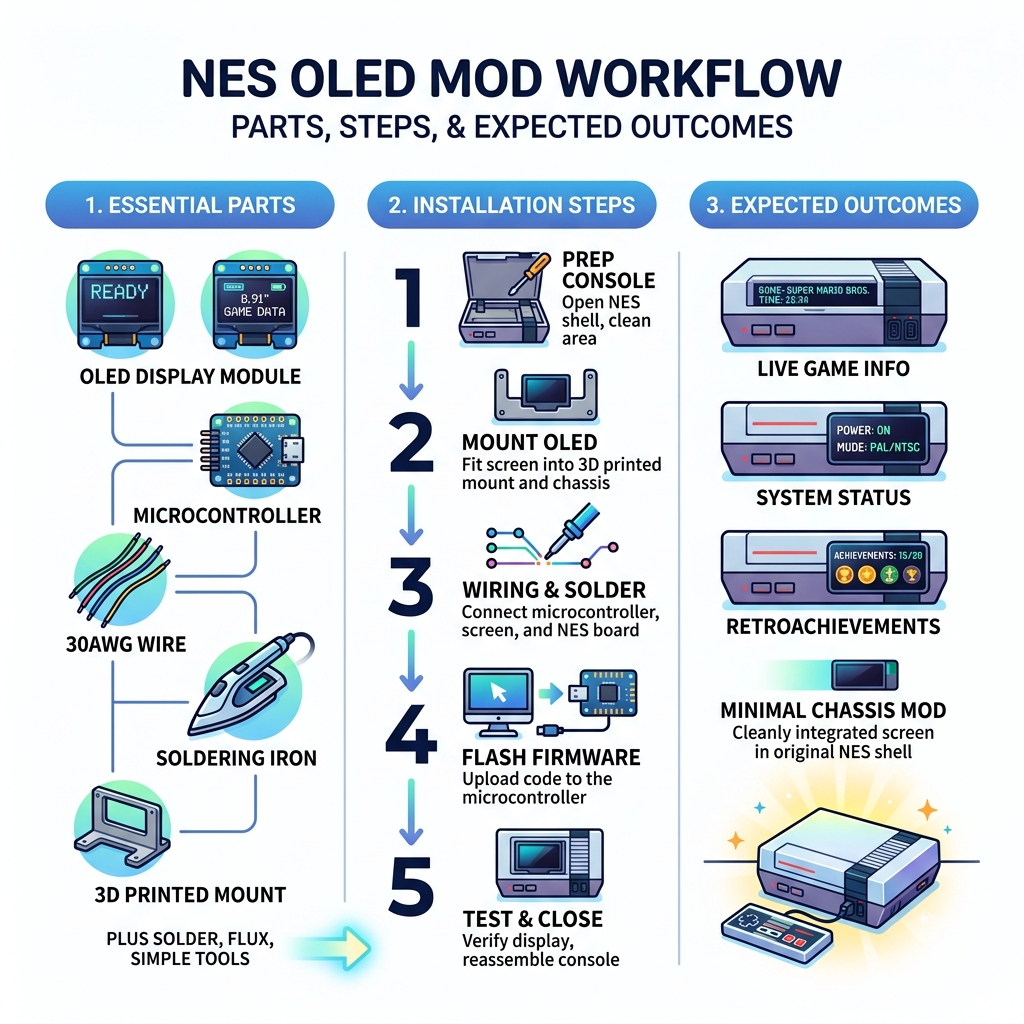
Understanding the NES OLED Mod and Its Benefits
When we talk about an “OLED mod” for the NES, we aren’t usually talking about replacing your 50-inch TV with a tiny screen inside the toaster. Instead, this mod typically refers to two exciting branches of hardware hacking: adding a high-contrast status display to the console shell or utilizing advanced modchips to interface with modern OLED televisions.
The most popular DIY project currently trending involves mounting a small SSD1306 OLED module (usually 0.91″ or 0.96″) into the NES chassis. This screen acts as a “smart dashboard.” It can display everything from the current game title and play time to more advanced features like RetroAchievements. For more technical background, you can check out more info about OLED mod installation to see how these displays are revolutionizing the scene.
Beyond just looking “cool” (and let’s be honest, it looks incredibly cool), these mods provide functional benefits. They can monitor power rails, show CPU temperatures for overclocked systems, or provide visual feedback for other mods like the NESRGB or Hi-Def NES. These modern touches are what keep the 8-bit era alive for today’s enthusiasts.
Skill Level and Prerequisites
We classify the nes oled mod guide as an Intermediate project. While you don’t need a degree in electrical engineering, you do need a steady hand and a basic understanding of circuit logic.
You will be:
- Disassembling the NES: This involves removing the outer shell and the inner RF shield.
- Soldering: You’ll need to solder small wires to specific points on the NES motherboard or expansion port.
- Flashing Firmware: You’ll likely use a microcontroller like a Raspberry Pi Pico or ESP32, which requires connecting to a PC to upload code.
If this is your very first time opening a console, we recommend starting with a simpler project. You can read our guide on your first handheld modification to build up your confidence before tackling the NES.
Performance Improvements and Visual Clarity
Why OLED? Traditional LEDs or LCDs often suffer from “light bleed” or poor viewing angles. OLED (Organic Light Emitting Diode) technology offers infinite contrast because each pixel produces its own light. When a pixel is black, it is completely off.
In the context of the NES, this means:
- Perfect Blacks: The status screen blends seamlessly into the black plastic of the NES shell.
- High Readability: Even tiny text is crisp and clear from across the room.
- Low Power Draw: These screens pull very little current (often less than 0.035A), meaning they won’t strain your 40-year-old power supply.
For those who want to keep the classic look while enjoying modern clarity, authenticity-focused screen mods are the gold standard.

Essential Tools and Components for Your Upgrade
To perform a successful nes oled mod guide installation, you need a specific set of tools. Don’t try to “wing it” with a hardware-store soldering iron; precision is key here.
Hardware List:
- OLED Display Module: Usually an I2C-based SSD1306 (128×32 or 128×64 resolution).
- Microcontroller: A Raspberry Pi Pico or ESP32 is the “brain” that talks to the NES and the screen.
- NES RA Adapter (Optional): If you want RetroAchievements, the odelot/nes-ra-adapter is the community favorite.
- Wiring: 30AWG or 32AWG Kynar wire is best for these tight spaces.
- Resistors: Usually 220 ohm for LED-related work, though specific OLED modules may vary.
The Tool Kit:
- Soldering Station: Temperature-controlled is a must.
- Desoldering Pump/Wick: For cleaning up factory solder.
- Flush Cutters: To trim wires close to the board.
- Precision Drill/Dremel: If you plan on mounting the screen through the plastic shell.
If you’re new to the workbench, our screen modding tutorial for beginners covers the basics of handling these delicate components.
Sourcing Components for Your nes oled mod guide
Most of these parts are readily available and quite affordable.
- AliExpress/eBay: Great for bulk OLED modules and microcontrollers. You can often find a 0.96″ OLED for under $5.
- GitHub: Projects like the NES RA Adapter provide the PCB files (Gerbers) that you can send to a manufacturer like JLCPCB or OshPark.
- 3D Printing: If you want a professional look, check sites like Thingiverse for “NES OLED brackets.” These allow you to mount the screen without messy hot glue.
For more specialized parts, check out custom screen mods for retro consoles.
Estimated Costs and Material List
Modding doesn’t have to break the bank. Here is a rough breakdown of what we expect you to spend:
- OLED Module: $3 – $7
- Raspberry Pi Pico: $4 – $6
- Misc Wire/Solder: $10 (if you don’t have it)
- Custom PCB (Optional): $5 – $15 for a pack of three.
- Total: Roughly $30 to $50 USD.
Compared to high-end video mods like the NESRGB ($99+) or the Hi-Def NES, the OLED status mod is one of the most cost-effective ways to modernize your console.
Step-by-Step nes oled mod guide for Retro Enthusiasts
Ready to get your hands dirty? Follow this general workflow. Specific wiring may change depending on whether you are using a front-loader (the “Toaster”) or a top-loader.
Preparing the NES Shell and Hardware
First, we need to decide where the screen goes. Most modders choose the area above the controller ports or the space next to the power button.
- Disassemble: Remove the 6 screws from the bottom of the NES. Lift the top shell.
- Mark Your Cut: Use masking tape to mark the exact dimensions of the OLED screen.
- The Cut: Using a Dremel or a sharp hobby knife, carefully remove the plastic. Pro tip: Start with a hole smaller than you need and file it down for a perfect, snug fit.
- Cleaning: Ensure all plastic burrs are removed so the screen sits flush.
For a similar process on handhelds, see our guide on installing IPS displays.
Wiring and Firmware Configuration
This is where the magic happens. The microcontroller needs to “listen” to the NES data bus to know what’s happening in the game.
- Flash the Brain: Connect your Pico or ESP32 to your computer. Download the firmware from the nes-ra-adapter GitHub. Drag and drop the
.uf2file onto the device. - The Solder Points: You will typically need to tap into:
- 5V Power: Found on the NES voltage regulator.
- Ground: Anywhere on the large copper shielding planes.
- Data Lines: If you are using the RA Adapter, you’ll be connecting to the expansion port pins on the bottom of the motherboard.
- Connect the OLED: Most OLEDs use four wires: VCC, GND, SCL (Clock), and SDA (Data). Connect these to the designated pins on your microcontroller.
If you are also interested in modern console mods, exploring how hardware glitching works on newer systems offers a great perspective, though the NES is much more forgiving!
Comparing OLED Upgrades to RGB and HDMI Mods
It is important to understand that an OLED status mod is different from a video mod. While the OLED mod adds a secondary screen for data, RGB and HDMI mods change how the game looks on your TV.
| Feature | OLED Status Mod | NESRGB Mod | Hi-Def NES (HDMI) |
|---|---|---|---|
| Primary Goal | Display game data/stats | Improve analog video | Digital 1080p output |
| Visual Change | New physical screen on console | Better colors on CRT/PVM | Pixel-perfect on flatscreens |
| Difficulty | Intermediate | Advanced | Expert |
| Cost | $30 – $50 | $100+ | $150+ |
| Reversibility | Moderate (shell cut) | Difficult | Very Difficult |
If you’re just starting out, we suggest reading handheld console modding 101 to learn about the different types of signal processing.
Troubleshooting and Maintaining Your Modified Console
Even the best modders run into issues. If your screen stays dark or shows “garbage” data, don’t panic.
Troubleshooting Your nes oled mod guide Installation
- No Power: Use a multimeter to check the voltage at the OLED’s VCC pin. It should be a steady 3.3V or 5V depending on your module.
- Garbled Text: This usually indicates a loose SDA or SCL wire. Re-flow your solder joints.
- Console Won’t Boot: You may have a solder bridge on the NES data bus. Check your connections at the expansion port or CPU pins.
- Flickering: Ensure your ground wire is solid. A “noisy” ground can cause I2C communication to fail.
For more help, browse our Category: Screen Mods for community-vetted fixes.
Reversibility and Legal Considerations
Is this mod permanent? If you cut the shell, you’ve made a permanent physical change. However, the electronics are entirely reversible. You can desolder the wires and return the NES to its factory state (minus the hole in the plastic).
Legal Note: Modding your own hardware is generally legal for personal use. However, be careful with “modchips” that bypass copy protection. The OLED mods discussed here are focused on aesthetics and data tracking, which are widely accepted in the hobbyist community.
Frequently Asked Questions about NES OLED Mods
Is the NES OLED mod reversible?
The electronic components can be removed easily. However, if you chose to cut a window in your NES shell for the screen, that part is permanent. We recommend using a spare “beater” shell if you are worried about preserving a mint-condition console.
How much does the total NES OLED upgrade cost?
If you already own a soldering iron, the parts (OLED, Pico, wires) will cost you roughly $30 to $40. If you need to buy tools, expect to invest about $100 total.
Do I need a modchip for the OLED screen to work?
Not a “modchip” in the traditional sense of piracy. You need a microcontroller (like a Raspberry Pi Pico) to act as a bridge between the NES hardware and the OLED screen.
Conclusion
At Ganhos Reais, we believe that retro consoles shouldn’t just be museum pieces—they should be evolving platforms. The nes oled mod guide is a perfect example of how we can respect the history of the 8-bit era while embracing the clarity and connectivity of 2025. Whether you’re tracking your high scores via RetroAchievements or just want a sleek power indicator that looks like it’s from the future, this mod is a rewarding weekend project.
Ready to take your next step into hardware hacking? Explore more retro modding guides and join our community of enthusiasts today!
