
Mod Kit Madness: Top Picks for Your Console
The Best Mod Kit Retro Display Options at a Glance
The best mod kit retro display upgrades available right now include:
- IPS LCD kits (e.g., Game Boy DMG-01 v2 series) – vivid color, same size as original, no lens swap needed
- Backlight mods (e.g., V3 ultra-thin models) – ultra-thin at 1.23mm, >90% uniformity, 9 color choices
- Drop-in LCD kits (e.g., GBA 3.0″ high-speed kits) – no trimming, touch brightness control, 8 color palettes
- OSD laminated IPS kits (e.g., GBA SP V5 series) – 720×480 resolution, pre-laminated glass, no shell mods
- Neo Geo Pocket Super OSD IPS kits – purpose-built for NGP/NGPC, priced around $63
Your classic Game Boy, Game Gear, or Neo Geo Pocket was incredible for its time. But let’s be honest — those original screens are hard to see in anything less than perfect lighting.
That’s where retro display mod kits come in.
These kits let you swap out the old reflective or dim LCD for a modern, backlit display — without gutting the soul of the console. You keep the original hardware. You keep the cartridges. You just actually get to see what you’re playing.
The retro modding community has exploded with options. Some kits drop right in with zero soldering. Others unlock features like on-screen display (OSD) menus, adjustable brightness, custom color palettes, and even laminated glass screens that block dust.
The challenge? Knowing which kit fits your console, your skill level, and your goals.
This guide cuts through the noise and shows you the top picks — so you can mod with confidence.

Why Upgrade with a Mod Kit Retro Display?
If you have ever squinted at a Game Boy Color under a desk lamp, you know the struggle. The primary reason we advocate for a mod kit retro display is simple: visibility. Original handheld screens relied on reflective polarizers that required direct sunlight or a bulky “worm light” to be playable.
Modern IPS (In-Plane Switching) technology has revolutionized this. Unlike the original displays, IPS screens offer 178-degree viewing angles. This means you don’t have to hold the console at one specific “sweet spot” to see the action. Furthermore, color accuracy is vastly improved. Modern kits often feature 8 to 20 different color palettes, allowing you to play in classic “pea soup” green or vibrant full color.
For those seeking the absolute pinnacle of black levels and contrast, AMOLED options are beginning to emerge in the market. These screens provide individual pixel lighting, making colors pop in a way that was unimaginable in 1989. Beyond just looking pretty, a high-quality backlight offers over 90% uniformity across the panel, eliminating the “hot spots” often seen in older front-light modifications. If you want to dive deeper into the technical side, check out our guide on upgrading handheld display for better visuals.
Essential Features of a Modern Mod Kit Retro Display
The “v2” and “v5” labels you see on products aren’t just marketing fluff; they represent massive leaps in user-friendly features.
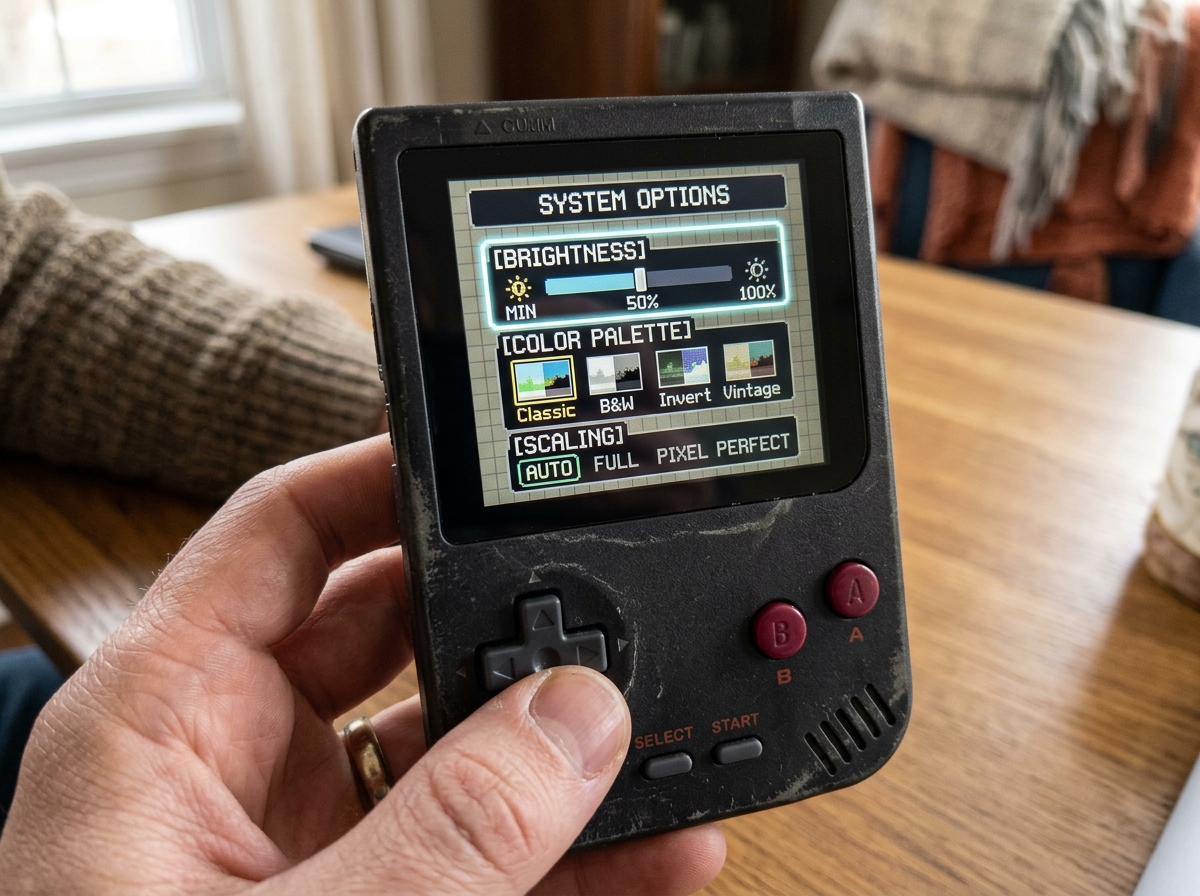
- OSD Menus (On-Screen Display): Modern kits allow you to control settings directly on the screen. By holding down a button combination (like Select + L + R), a menu pops up allowing you to toggle brightness, position the image, or change pixel effects.
- Touch Sensors: Many kits now include tiny copper pads that stick to the inside of the shell. A simple tap on the top of your console can cycle through 15 levels of brightness or change color palettes without needing to drill holes for new buttons.
- Integer Scaling: To avoid “shimmering” or distorted graphics, top-tier kits use integer scaling (like 9 pixels to 1 pixel). This ensures that a 160×144 resolution game looks crisp on a higher-resolution 720×480 panel.
- Retro Pixel Effects: Some of us miss the “grid” look of old screens. High-end kits offer scanline modes and “Retro Pixel” filters to simulate the look of the original hardware while keeping the brightness of a modern screen.
If you’re ready to start your journey, we have a detailed walkthrough on installing IPS display on Game Boy to help you through the process.
Top Display Technologies for Classic Consoles
Choosing the right mod kit retro display depends on how much you want to change the “feel” of your handheld. Here is how the main technologies stack up:
| Feature | IPS LCD (V5/Q5) | AMOLED | Backlight V3 (DMG/GBP) |
|---|---|---|---|
| Resolution | Up to 720×480 | High Definition | Original Resolution |
| Viewing Angle | 178 Degrees | Perfect | Limited |
| Installation | Moderate (Drop-in avail.) | Advanced | Technical (Peeling film) |
| Power Use | Moderate to High | High | Low |
| Best For | GBA, GBC, Game Gear | GBC Enthusiasts | Purists (DMG/Pocket) |
The IPS LCD is the current gold standard. It provides vibrant colors and is often “laminated,” meaning the glass lens is pre-fused to the LCD. This eliminates the gap where dust usually gets trapped.
For the Game Boy Advance SP, kits like the V5 series offer a “drop-in” design that requires zero shell trimming. Meanwhile, for the original Game Boy (DMG), the V3 Backlight is a favorite for purists. It is incredibly thin (1.23mm) and fits behind the original LCD. It preserves the original hardware but adds a much-needed light source.
However, be aware that these modern screens are more power-hungry. We often recommend pairing these displays with a USB-C rechargeable battery mod to keep your sessions going longer. For those interested in the cutting edge, we offer insights on OLED mod installation for retro consoles.
Installation and Safety: What to Know Before You Mod
We cannot stress this enough: always perform a “dry run.” Before you peel off any adhesive or screw the shell back together, connect the ribbon cables and power on the console.
Testing the screen while it is still outside the shell ensures that the ribbon cable is seated correctly and that there are no dead pixels. Most vendors will not accept returns once the protective film is removed or the kit is glued down.
Common Components in a Kit:
- The LCD Panel: Often very fragile; never press down on the center of the screen.
- Ribbon Cable/PCB: The “brain” that translates console signals for the new screen.
- Acrylic Spacers: These help center the screen in an original shell.
- Adhesive Strips: Used to secure the screen (use these last!).
Handling these parts requires patience. Ribbon cables are notoriously thin and can tear if bent at sharp angles. For a full list of precautions, see our DIY screen replacement safety tips.
Choosing Your Mod Kit Retro Display Difficulty Level
Not all mods are created equal. We generally categorize them into three levels:
- Level 1: Drop-in (Beginner): Kits like the Game Boy Advance 3.0 inch Drop-in LCD require no cutting of the plastic shell. You simply take the old screen out and put the new one in. Some even offer touch controls so you don’t have to solder a single wire.
- Level 2: Trimming Required (Intermediate): Some larger “Q5” screens for the Game Boy Color require you to shave off some plastic inside the shell using side cutters or a hobby knife. Alternatively, you can buy “Pre-cut” shells to skip this step.
- Level 3: Soldering & Delicate Work (Advanced): While many kits are “solderless” for basic function, you might need to solder 1-3 small wires to enable button-controlled brightness or to install a “Bivert” chip on a DMG for better contrast.
If you are working on a Game Boy Advance, remember to check if your motherboard is 32-pin or 40-pin, as many kits include cables for both. For more on choosing the right project, visit our guide on DIY retro handheld screen upgrade.
Frequently Asked Questions about Retro Display Mods
Which consoles are compatible with display mod kits?
Almost every major handheld from the 80s and 90s has a mod kit available today. This includes:
- Nintendo: Game Boy (DMG), Pocket, Color, Advance, and SP.
- SEGA: Game Gear (which desperately needs it due to failing factory capacitors).
- SNK: Neo Geo Pocket and Pocket Color.
- Atari: Lynx (V1 and V2).
Do I need to solder to install a new screen?
In many cases, no! Many modern mod kit retro display options use touch pads for brightness control. Soldering is usually only required if you want to use the console’s physical buttons (like Select + L/R) to control the OSD menu.
What is a laminated display mod?
A laminated display has the protective glass lens glued directly to the LCD at the factory. This is the “gold standard” because it prevents dust from ever getting between the screen and the lens. It also makes the colors look more “pressed” against the glass, similar to a modern smartphone.
Conclusion
At Ganhos Reais, we believe that modding isn’t just about making an old toy look better—it is about preservation. By installing a modern mod kit retro display, you are ensuring that your classic hardware remains playable for another thirty years. Whether you want a simple drop-in kit for your GBA or a high-end OSD IPS display for your Game Gear, the options have never been better.
Customizing your console allows you to express your style while enjoying the games exactly as the original artists intended (just with a lot more brightness!). If you’re ready to transform your gaming experience, explore our custom screen mods for retro consoles or visit our homepage at https://ganhosreais.com/ for more expert tutorials. Happy modding!
