
Give Your Old Handheld a New Life with a Fresh DS Lite Housing Shell
Why a DS Lite Replacement Shell Can Transform Your Classic Handheld
A ds lite replacement shell is an aftermarket full housing kit that lets you swap out the original plastic casing of your Nintendo DS Lite – giving it a fresh look, fixing cracks, or setting the stage for mods like an IPS screen upgrade.
What to look for in a quality DS Lite replacement shell:
- Material: Look for high-grade ABS plastic for durability and a premium feel.
- Compatibility: Ensure the shell is compatible with your specific model and any planned mods, such as IPS screens.
- Completeness: A good kit should include the housing, buttons, screen lens, and necessary screws.
- Fitment: Check reviews for mentions of “OEM-like” fit to avoid gaps or sticky buttons.
Top things to know before you buy:
- Most kits include the top and bottom shells, buttons, screen lens, and basic tools
- High-quality aftermarket shells are made from durable, non-toxic ABS plastic and are widely considered among the best options
- Hinges are often not included – you’ll need to reuse your originals
- Some generic shells may require trimming to fit correctly
- Installation requires disassembly and basic comfort with small electronics
The Nintendo DS Lite launched in 2006 and became one of Nintendo’s best-selling handhelds. Millions of units are still in circulation today – and after nearly two decades, many of those shells are yellowed, cracked, or just plain tired-looking. The good news? You don’t need to buy a new console. A replacement shell can make your DS Lite look better than it did out of the box, and with the right kit, you can even customize it with finishes that Nintendo never offered – think chameleon color-shifts, retro patterns, or crystal-clear transparent housings. If you want background on the system itself, the Nintendo DS Lite page offers a useful overview of the hardware and its place in Nintendo’s handheld lineup.
As one buyer summed it up after replacing their shell: “Works well. Would recommend this shell if you need to fix up an old DS and don’t want to buy OEM parts.”
This guide walks you through everything – from picking the right shell to installing it without damaging your console.

Understanding the DS Lite Housing Kit
When we talk about a ds lite replacement shell, we aren’t just talking about a plastic snap-on cover. We are referring to a “full housing” replacement. This involves taking the entire console apart and moving the internal motherboard, screens, and speakers into a brand-new body.
Why would someone go through all that trouble? Usually, it’s because the original hinge has snapped—a common “death sentence” for the DS Lite—or the plastic has become brittle and yellowed over time. By using a durable replacement shell, you can essentially reset the clock on your hardware’s lifespan.
Most high-quality kits are manufactured using ABS plastic. This material is favored because it is non-toxic, odor-free, and offers a balance of flexibility and strength. A complete kit typically includes:
- The front and back plates for the top and bottom halves.
- A new screen lens (often glass or high-clarity plastic).
- A full set of buttons (A, B, X, Y, D-pad, Start, Select, L/R bumpers).
- New rubber conductive membranes.
- A color-matched stylus.
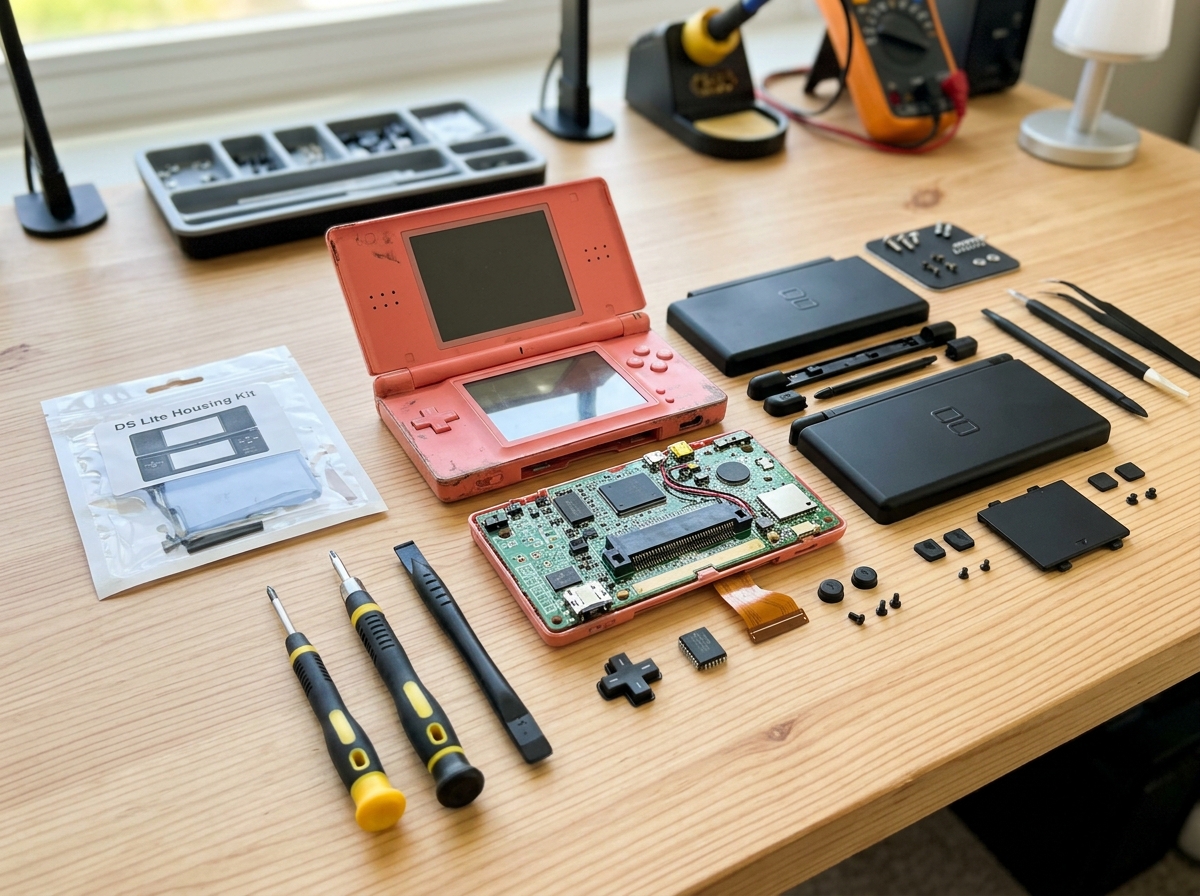
Essential Components in a Full Kit
A “Full Shell” kit should be comprehensive, but you must check the fine print. While most include the housing halves and a bag of screws, many kits do not include the metal hinge mechanism or the small metal ring that holds the top screen ribbon cable in place. You will usually need to salvage these from your old console.
If you are performing a full restoration, you might also be looking at replacing the internal screens if yours have dead pixels or “screen rot.” Combining a shell swap with a screen refresh is the ultimate way to bring a dead console back to life.
Choosing the Best ds lite replacement shell for Your Project
Not all shells are created equal. If you browse various online marketplaces, you will find shells for very low prices. While tempting, these often suffer from “poor tolerances.” This means the plastic might be slightly warped, or the screw holes don’t align perfectly.
In the modding community, certain premium aftermarket brands are highly regarded. Their molds are much closer to the original Nintendo (OEM) specifications. For example, high-end shells are known to fit flush on all clips, meaning you won’t have unsightly gaps on the sides of your console.
Popular Colors and Designs for Your ds lite replacement shell
This is the fun part! The variety of designs available today is staggering. You are no longer limited to the standard Polar White or Onyx Black.
- Transparent / Clear Aesthetics: “Clear Atomic Purple” and “Crystal Clear” are perennial favorites, allowing you to see the internal circuitry.
- Chameleon Finishes: These shells change color depending on how the light hits them, shifting between shades like purple and blue.
- Themed Designs: You can find shells inspired by classic consoles, artistic patterns like the Great Wave, or vibrant colors like Cherry Pink.
- Metallic & Soft-Touch: Some shells offer a “velvet” or “soft-touch” feel, which provides a more premium grip than the original glossy plastic.
If you enjoy this level of customization, you might also be interested in our guides for Game Boy Color shell replacements.
| Finish Type | Pros | Cons |
|---|---|---|
| Solid Color | Closest to original look; hides internal dust. | Can look “generic” if quality is low. |
| Transparent | High “cool factor”; shows off the tech. | Internal wires must be routed perfectly to look good. |
| Chameleon | Unique, premium look; color-shifting effect. | Slightly more expensive; shows fingerprints. |
| Themed | Instant personality; great for collectors. | Print can wear off over years of heavy use. |
Quality Differences and Modder Reviews
When reading reviews for a ds lite replacement shell, look for mentions of “fitment.” A common complaint with cheaper shells is that the buttons feel “mushy” or the L/R bumpers get stuck. Premium shells often include 95% of the OEM fit quality.
One expert tip: Watch out for the screws. Many aftermarket kits include screws that are made of softer metal. If you aren’t careful, they strip easily. Many modders prefer to reuse the original Nintendo screws whenever possible because they are much more durable.
Tools and Preparation for a Successful Reshell
Before you start unscrewing things, you need the right tools. Nintendo uses proprietary “Tri-wing” screws to keep people out of their hardware. If you try to use a flathead screwdriver, you will ruin the screw.
Required Tool Kit:
- Tri-wing Screwdriver (Y00): For the external case screws.
- Phillips #00 Screwdriver: For the internal motherboard and battery screws.
- Plastic Spudger: To pry the shell apart without scratching it.
- Tweezers: Essential for handling the tiny ribbon cables and the Wi-Fi antenna wire.
- Screw Organizer: A magnetic mat or even an egg carton to keep track of which screw goes where.
While some enthusiasts explore 3D printed shell options, we generally recommend injection-molded ABS for the DS Lite due to the complexity of the hinge mechanism.
Preparing Your Console for Disassembly
Clean your workspace. Static electricity can kill a motherboard, so work on a non-conductive surface. Start by removing the battery and the stylus. A key part of preparation is cleaning the internals while the console is open. Use 90% or higher Isopropyl Alcohol to clean the button contacts on the motherboard—this will ensure your “new” DS Lite plays as well as it looks.
Step-by-Step Guide to Installing Your New DS Lite Housing
Replacing the shell is a delicate process. Here is the general flow of the operation:
- Open the Bottom Shell: Remove the seven screws on the back (some are hidden under rubber feet). Gently pry the bottom shell off, being careful not to rip the wires for the L and R buttons.
- Remove the Motherboard: Disconnect the small ribbon cable for the bottom screen and the Wi-Fi antenna. Lift the motherboard out carefully.
- The Hinge and Top Screen: This is the hardest part. You must feed the top screen’s ribbon cable through a small metal ring in the hinge. Do not force this. If you tear this cable, your top screen is ruined.
- Transfer Components: Move the speakers, screens, and hinges into the new shell.
- Reassembly: Place the buttons and conductive pads into the new shell, then lay the motherboard on top. Reconnect all cables.
Common Installation Challenges with a ds lite replacement shell
The DS Lite is notorious among modders for its ribbon cable fragility. The cable that connects the top screen to the motherboard must be rolled tightly to fit through the hinge. If it’s not perfectly aligned, the console won’t turn on (it will usually flash a white screen and then shut off).
Another challenge is shell trimming. Some aftermarket shells have tiny bits of extra plastic (flash) from the molding process. If your shell isn’t closing properly, check the edges and use a hobby knife to carefully trim any excess. Also, ensure your power switch is aligned; it’s easy to accidentally break the plastic tab on the motherboard if the shell isn’t seated correctly.
Maintenance and Alternatives to Full Shell Replacement
Once your console is reshelled, you’ll want to keep it looking pristine.
- Cleaning: Only use a damp cloth or a wipe with less than 70% alcohol. Never spray liquid directly onto the shell, as it can seep into the screen layers.
- Protection: If you want to avoid scratches on your new perfect-fit shell, consider a “Crystal Case”—a clear, hard plastic snap-on protector.
If a full shell replacement feels too intimidating, you can opt for vinyl skins or stickers. These won’t fix a broken hinge, but they can cover up scratches and yellowing without requiring you to open the console.
Frequently Asked Questions about DS Lite Shells
Does a new shell include the internal hinges?
Most “Full Housing” kits do not include the metal hinge mechanisms. You will need to remove the hinges from your old shell. If your original hinge is broken, you must buy a separate “DS Lite Hinge Kit” along with your shell.
Can I use a replacement shell for an IPS screen mod?
Yes! Many modern shells are designed to be “IPS-ready.” This means they have been pre-trimmed to fit the slightly larger modern screens without you needing to cut the plastic yourself.
How do I prevent the new screws from stripping?
The screws in aftermarket kits are often self-threading. This means they cut their own path into the plastic as you turn them. Go slow. If you feel significant resistance, back the screw out and try again. Never over-tighten, or you might see the plastic “bloom” or crack on the other side of the shell.
Conclusion
At Ganhos Reais, we believe that old hardware shouldn’t be discarded just because it looks a bit worn. Replacing your ds lite replacement shell is one of the most rewarding DIY projects a retro gamer can undertake. It requires patience and a steady hand, but the result is a “new” console that reflects your personal style and is ready for another decade of gaming.
Whether you’re going for a nostalgic Scarlet Red or a futuristic Atomic Purple, the satisfaction of clicking that power switch on a freshly restored handheld is unbeatable.
Ready to start your restoration? Explore our full collection of replacement shells and give your favorite handheld the upgrade it deserves.
