
Game Boy Advance OLED Upgrades and Where to Find Them
The Best GBA OLED Mod Kits and Where to Find Them
A GBA OLED mod kit is one of the most exciting upgrades you can make to a classic handheld console. These kits replace the original dim, washed-out screen with a vivid AMOLED display – bringing your retro games to life like never before.
Here are the top things to know right away:
- What it is: A screen replacement kit that swaps the original LCD for a modern AMOLED/OLED panel
- Best for: Game Boy Color (GBC) – true OLED kits for the original GBA are not yet widely available; IPS kits remain the top choice for GBA
- Key brands: HISPEEDIDO is a leading name in GBC OLED kits
- Install difficulty: Beginner-friendly – most kits require soldering just one wire
- Shell requirement: A custom or pre-trimmed shell is required – original shells are not compatible
- Display upgrade: 25% larger viewing area than the original screen
- Battery life: Expect roughly 4-6 hours depending on brightness settings
- Price range: Kits typically run $65-$90; pre-modded consoles can cost $300+
The upgrade is dramatic. One modder described their finished build as looking “a million times better in person” – and the retro gaming community widely agrees that photos don’t do these screens justice.
If you’ve been sitting on a dusty Game Boy and wondering whether the mod is worth it, the short answer is: yes, absolutely.
Key Features of a Premium GBA OLED Mod Kit
When we talk about a GBA OLED mod kit, it is important to clarify the current state of the market. While the Game Boy Color (GBC) has seen a massive influx of true AMOLED panels, the original Game Boy Advance (GBA) primarily utilizes high-end IPS technology. However, the features found in these premium kits—whether OLED for GBC or high-end IPS for GBA—share a goal: total visual transformation.
A premium kit, such as those produced by HISPEEDIDO, utilizes AMOLED technology to provide “inky blacks.” Unlike traditional LCDs that have a backlight always shining through, OLED pixels turn off completely. This creates a contrast ratio that makes colors “pop” in a way that feels almost magical.
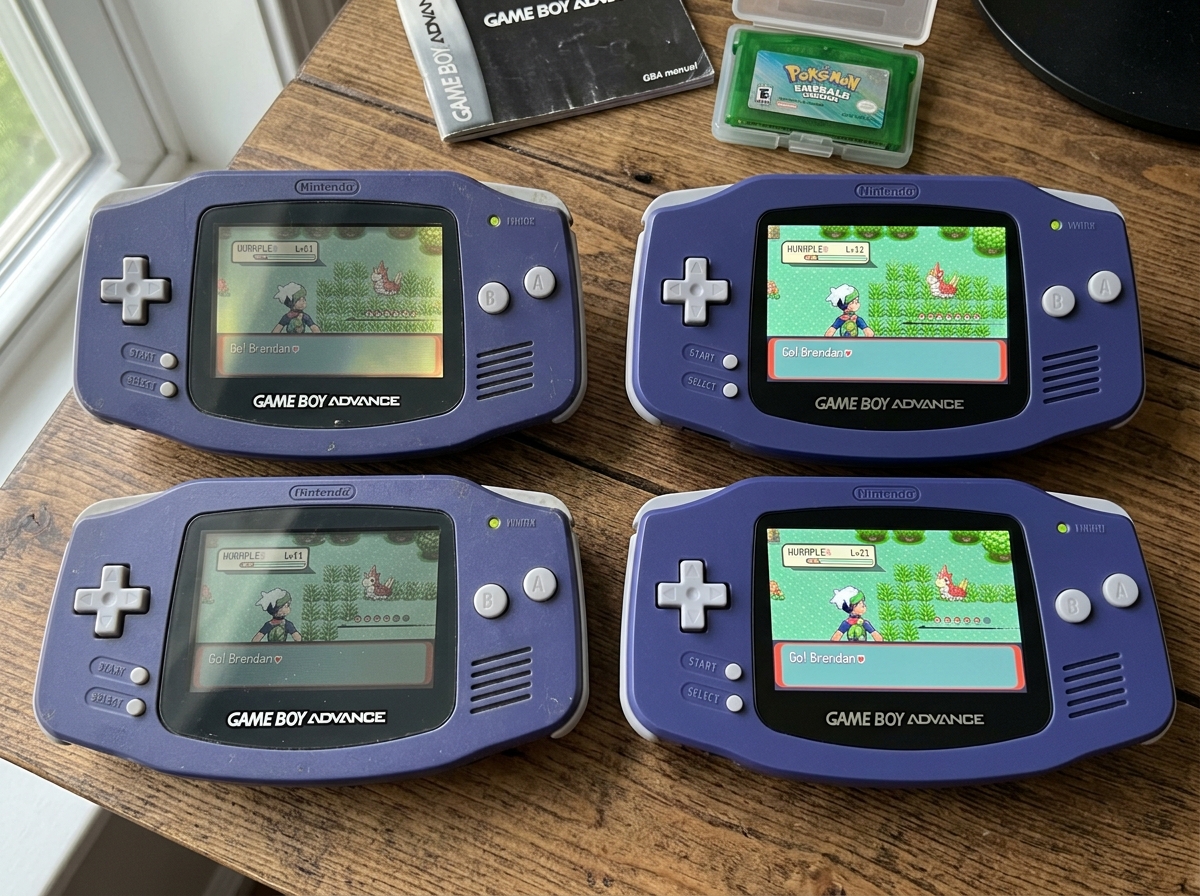
Beyond the panel itself, these kits are packed with modern quality-of-life features:
- 10 Brightness Levels: Fine-tune your experience for a dark room or a sunny park.
- 8 Color Modes: Change the palette to suit your mood or the specific game aesthetic.
- 4 Retro Pixel Effects: These modes simulate the original LCD grid lines, giving you a sharp image that still feels “retro.”
- 32 Logo Colors: You can even customize the illuminated “Game Boy” logo at the bottom of the screen.
- Integer Scaling: With a 16:1 pixel ratio, the image remains perfectly proportional without the shimmering or distortion found in cheaper screens.
- Touch-Activated OSD: Most modern kits allow you to change settings by simply touching the top of the shell or the screen lens for a few seconds.
- Laminated Lens: The screen and the glass lens are fused together. This means no dust can ever get trapped between the screen and the lens—a common frustration with older mods.
- 25% Larger Area: Many of these kits offer a viewing area that is significantly larger than the stock screen, filling out more of the front face of the console.
For more details on how these screens compare across different generations, check out our guide on Oled Mod Installation For Retro Consoles.
OLED vs. IPS: Which Display Reigns Supreme?
In handheld restoration, the debate between OLED and IPS is a hot topic. Currently, if you are modding a GBA, you will likely be looking at a V5 IPS kit. If you are modding a GBC, the AMOLED kits are the new gold standard.
| Feature | OLED (AMOLED) | IPS (In-Plane Switching) |
|---|---|---|
| Contrast | Infinite (True Blacks) | High (Glow in dark scenes) |
| Power Draw | Efficient (Variable) | Consistent (Higher at max) |
| Viewing Angles | Perfect | Excellent |
| Color Saturation | Vibrant/Oversaturated | Natural/Accurate |
| Refresh Rate | Instant | Fast (Can have tearing) |
IPS technology is incredible for viewing angles. You can tilt the console almost 180 degrees and still see the image clearly. However, some GBA IPS kits have been noted to have “diagonal tearing” during fast transitions – a minor visual glitch that some users find annoying while others barely notice.
OLED, on the other hand, provides that “inky black” look that makes classic titles like Metroid Fusion or Castlevania look hauntingly beautiful. The power consumption on OLED is also dynamic; because black pixels are “off,” dark games can actually save you a bit of battery life compared to an IPS screen that requires a constant backlight.
If you are just starting your journey, we recommend reading our Screen Modding Tutorial For Beginners to see which technology fits your skill level and budget.
Installation Guide and Technical Requirements
Installing a GBA OLED mod kit (or a high-end IPS equivalent) is surprisingly accessible, but it does require a steady hand. Most modern “drop-in” kits have moved away from the complex soldering of the past.
The core components of a kit usually include:
- The Display Panel: Often a laminated AMOLED or IPS screen.
- Ribbon Flex Cable: This connects the screen to the Game Boy motherboard.
- Driver PCB: A small circuit board that handles the image processing and OSD menu.
- Soldering Wire: Usually just one thin wire.
The “one-wire soldering” requirement is typically for the power supply. You solder one end to the Game Boy’s power switch or a specific capacitor to ensure the screen gets enough juice to run the backlight and the touch functions. While some kits claim to be “solder-free,” soldering that single wire is usually necessary to unlock the On-Screen Display (OSD) menu for brightness and pixel effects.
Choosing the Right Shell for Your GBA OLED Mod Kit
One of the most important things we tell our readers is: Do not try to use your original shell.
Original Game Boy shells were designed for much smaller, thicker, non-backlit screens. To fit a modern OLED or IPS panel, you would need to use a hobby knife or a rotary tool to cut away significant amounts of plastic. It is messy, difficult, and easy to mess up.
Instead, we recommend purchasing a pre-trimmed shell. These custom housings are designed specifically for laminated screens. They often come with:
- Laminated Fit: The front of the shell is molded to perfectly hold the screen without gaps.
- Alignment Brackets: 3D-printed or plastic spacers that ensure the screen is perfectly centered.
- Transparent Options: Many modders love clear shells to show off the internal ribbon cables and the glow of the OLED.
Check out our Custom Screen Mods For Retro Consoles section for inspiration on shell and button combinations.
Installation Safety for Your GBA OLED Mod Kit
Safety is paramount when working with vintage electronics. Before you start, we suggest reviewing our Diy Screen Replacement Safety Tips.
- Static Electricity: Work on an anti-static mat if possible. A static discharge can fry your Game Boy’s CPU or the new screen’s driver board.
- Ribbon Cable Fragility: These cables are paper-thin. Never fold them sharply or pull on them with force.
- Pressure Points: OLED and IPS screens are made of glass. If you force the shell closed and there is a piece of plastic pushing against the back of the screen, it will crack. Always ensure your shell is properly trimmed.
- Testing Before Assembly: This is our #1 tip. Connect the screen to the motherboard and turn it on before you put it in the shell. If the screen is defective, it’s much easier to return if it hasn’t been glued into a housing yet.
Battery Life and Power Management
A common question we get is: “Will this kill my battery?”
It is a valid concern. The original Game Boy Advance was designed for a screen that didn’t use any power for a backlight. Adding a high-definition AMOLED or IPS panel increases the power draw significantly.
On standard AA batteries, you can expect between 4 and 6 hours of gameplay. This depends heavily on your brightness settings and volume. If you are playing at max brightness with the volume cranked, you might even see that dip closer to 3 hours.
To combat this, many enthusiasts pair their GBA OLED mod kit with a USB-C rechargeable battery module. These LiPo (Lithium Polymer) battery packs replace the AA cells and provide:
- Consistent Voltage: Keeps the screen bright even as the battery gets low.
- Modern Charging: No more hunting for AAs; just plug into any phone charger.
- Longer Playtime: High-capacity packs can often push your playtime back up toward the 8-10 hour mark.
For a deeper dive into power options, visit our guide on Diy Retro Handheld Screen Upgrade.
Frequently Asked Questions about GBA OLED Mods
Does the OLED kit fit in an original Game Boy Advance shell?
Generally, no. While you can modify an original shell with enough cutting and sanding, it is not recommended. Modern OLED and laminated IPS kits are larger than the original screen window. Using a custom housing ensures a clean look and prevents the “air bubble” or “gap” issues that some users report when trying to force a fit.
Is soldering required for the GBA OLED installation?
For most kits, yes—but only one wire. This wire supplies power to the screen’s driver board. While the image will often display without it, you won’t be able to use the touch controls or the OSD menu to change brightness or pixel modes. It is a very simple solder point, making it a great project for those who want to learn Installing Ips Display On Game Boy.
How do I access and navigate the On-Screen Display (OSD) menu?
Most modern GBA OLED mod kits use touch sensors.
- Activation: Touch and hold the top of the console (or a specific spot on the lens) for about 5 seconds.
- Navigation: Once the menu appears, you can usually tap to cycle through options like Brightness, Color Mode, and Pixel Effects.
- Adjustment: Some kits allow you to slide your finger to increase or decrease values.
If your screen isn’t responding or the menu won’t appear, you might need to check our Troubleshooting Handheld Screen Issues guide.
Conclusion
Upgrading your handheld with a GBA OLED mod kit is the ultimate way to bridge the gap between nostalgia and modern technology. At Ganhos Reais, we believe that these classic consoles deserve to be played, not just displayed on a shelf. By installing a vibrant AMOLED or high-end IPS screen, you aren’t just fixing an old toy; you’re creating a premium gaming device that rivals modern handhelds in visual clarity.
Whether you’re looking for the inky blacks of an OLED or the sharp, fast performance of a V5 IPS, the retro gaming community has never had better options. Take your time, choose a pre-trimmed shell, and don’t forget to test your screen before the final screw goes in!
For more step-by-step walkthroughs and hardware tips, explore our Category Screen or check out More info about handheld modification guides. Happy modding!
