
The Ultimate Game Boy Screen Modding Tutorial: From IPS to OLED
Why a Tutorial Mod Game Boy Project Is Worth Your Time
Tutorial mod Game Boy projects are one of the most rewarding upgrades you can make to classic hardware. Here’s a quick overview of what’s involved:
Quick-start summary:
- Choose your model – The Game Boy Advance (AGB-001) is the best starting point for beginners
- Pick your screen – IPS kits ($30-55) are the most popular; OLED is the premium option
- Gather your tools – Tri-wing screwdriver, Phillips head, Kapton tape, isopropyl alcohol
- Shell swap (optional) – Takes just 15-20 minutes, no soldering needed
- Install the screen – Basic IPS installs take 30-45 minutes; no soldering required for drop-in kits
- Test and reassemble – Always test components before closing the shell
Playing a stock Game Boy in 2026 is a tough experience. The original screens have no backlight, the plastic lenses are scratched, and the displays look washed out compared to anything modern.
The good news? You don’t need to be an engineer to fix all of that.
A modern IPS screen kit transforms a dim, hard-to-read display into something crisp and vibrant — playable in any lighting condition. A shell swap takes under 20 minutes with just a screwdriver. And a full build (IPS screen, new shell, fresh buttons, and glass lens) typically runs $50-70 in parts.
The Game Boy has one of the largest modding communities in all of retro gaming. Whether you want a subtle upgrade or a fully custom build, there’s a clear path to get there.
This guide covers everything — from picking the right model to installing screens, swapping shells, and handling more advanced mods like USB-C charging.

Essential Tools and Parts for Your Tutorial Mod Game Boy Project
Before we crack open your childhood console, we need to ensure your workbench is ready. Modding is incredibly therapeutic, but only if you aren’t hunting for a dropped screw in the carpet or realizing you lack the right bit halfway through.
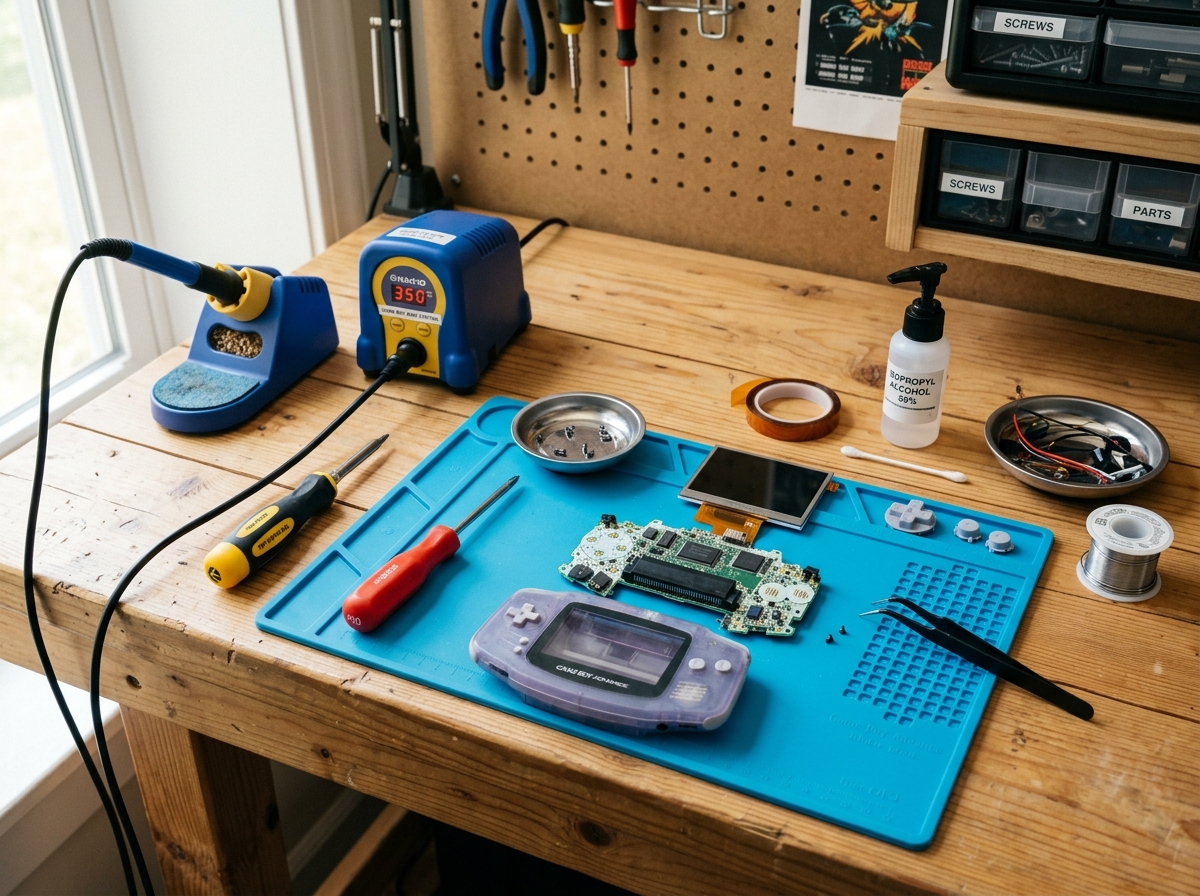
To start with any tutorial mod Game Boy project, you’ll need a few non-negotiable tools:
- Tri-wing Screwdriver: This is the “anti-tamper” bit Nintendo used. You cannot open the shell without it.
- Phillips Head Screwdriver (#00): Used for the internal screws holding the motherboard in place.
- Kapton Tape: Essential for insulating components and preventing shorts. It is heat-resistant and doesn’t leave gooey residue.
- Isopropyl Alcohol (90%+): For cleaning 30 years of “gamer gunk” and battery acid off the PCB.
- Plastic Spudger: To pry connectors and screens without scratching the plastic or shorting the board.
- Soldering Iron: Optional for “drop-in” kits, but required if you want brightness control or audio mods.
If you are new to this, we recommend checking out our Starting with Console Modding: An Easy Guide for Beginners and Handheld Console Modding 101: A Beginner’s Guide to get comfortable with the basics.
Comparison: IPS vs. OLED vs. Traditional Backlight
| Feature | Traditional Backlight (DMG/Pocket) | IPS Screen Kit | OLED Screen Kit |
|---|---|---|---|
| Visual Quality | Nostalgic, low contrast | Vibrant, high contrast | Perfect blacks, saturated colors |
| Difficulty | High (involves peeling film) | Moderate (Drop-in available) | Intermediate (Power management) |
| Soldering | Required | Optional (for brightness) | Usually Required |
| Cost | $10 – $20 | $30 – $55 | $60 – $90 |
Beginner-Friendly Tutorial Mod Game Boy Models
If this is your first time, we cannot recommend the Game Boy Advance (AGB-001) enough. Unlike the GBA SP, which has a tricky hinge and very tight internal tolerances, the original horizontal GBA has plenty of room to work.
The documentation for the AGB-001 is vast, and the results are dramatic. Taking a dim, non-backlit GBA and installing an IPS v2 kit is the “gold standard” beginner project. It turns a barely playable relic into a powerhouse. For more on this specific journey, read our Turn Your Game Boy Into a Powerhouse: Beginners Modding Guide.
Essential Components for a Full Build
A “full build” means you are essentially keeping only the original motherboard and replacing everything else. This is a great strategy if you buy a “broken” Game Boy on eBay for cheap—as long as the motherboard works, the rest is replaceable.
- IPS Kits: These usually include the LCD, a ribbon cable adapter, and sometimes a centering bracket.
- Glass Lenses: Toss the plastic one. Glass is clearer and much harder to scratch.
- Silicone Membranes: If your buttons feel “mushy,” new membranes will restore that snappy, tactile click.
- Replacement Buttons: You can find these in every color imaginable, from “solid” to “glow-in-the-dark.” See our Button Replacement Tips for Beginners for installation tricks.
Choosing the Right Model and Screen Kit
Every Game Boy model presents a unique challenge. Here is a breakdown of what to expect for each:
- DMG (Original Game Boy): The easiest to disassemble but the hardest to backlight “the old way.” We now suggest “drop-in” IPS kits that replace the entire front PCB. Check out our Backlight Mod for Original Game Boy for the classic approach.
- Game Boy Pocket (MGB): Very tight space. Power management is an issue here; IPS screens draw more current, which can cause the console to reboot if your batteries are low. See our Backlight Installation for Game Boy Pocket for more details.
- Game Boy Color (CGB): A fan favorite. The modern Q5 kits offer a larger screen area than the original, making games look better than they ever did in 1998. For help with this, visit Game Boy Color Screen Replacement Tips.
- Game Boy Advance (AGB/AGS): The peak of modding. Whether you have the original or the SP, these are the most satisfying to upgrade. Learn the specifics at Installing IPS Display on Game Boy.
Screen Testing and Preparation
CRITICAL RULE: Always test your screen before you install it. Most vendors will not accept returns once the adhesive is peeled or the ribbon is folded.
To test, simply open the Game Boy, plug the ribbon cable into the motherboard, and pop in some batteries. If the screen lights up and shows a clear image, you’re good to go. If it’s dead or has lines, contact your seller immediately. This is a vital step in any Screen Modding Tutorial for Beginners.
Advanced Tutorial Mod Game Boy: Soldering and OLED Options
For those looking for the absolute “best” experience, OLED technology has finally arrived for the Game Boy. These screens offer “infinite” contrast because each pixel provides its own light.
However, OLED and high-end IPS mods often require soldering for:
- Brightness Control: Soldering 1-3 tiny wires to the L, R, and Select buttons.
- Power Regulation: Some high-draw screens need a dedicated power wire to the battery terminal to prevent flickering.
If you’re interested in the software side of these classic machines, such as how games like Tetris were coded to handle these displays, check out How to make Tetris for the Nintendo Gameboy – Larold’s Retro Gameyard .
Step-by-Step Guide: Installing an IPS Screen
Let’s walk through a standard IPS installation for a Game Boy Advance.
- Disassembly: Remove the six Tri-wing screws from the back, then the one Phillips screw holding the motherboard. Carefully flip the motherboard over.
- Ribbon Disconnection: Flip the two small tabs on the ribbon connector up and slide the old screen’s cable out.
- Shell Trimming: If you aren’t using a “pre-cut” shell, you must use flush cutters to snip away the plastic nodules inside the screen window. This allows the larger IPS screen to sit flat.
- Dust Removal: This is the hardest part. Use compressed air and a microfiber cloth. Any speck of dust left on the LCD will be visible forever once the lens is glued on.
- Installation: Place the centering bracket, then the LCD. Connect the new ribbon cable to the motherboard and the screen.
For a deeper dive, see our Game Boy Advance Screen Mod Tutorial.
Preparing the Shell for Modern Displays
Many modern IPS kits are slightly larger than the original LCDs. You have two choices:
- The Pro Way: Buy an “IPS-ready” shell. These are pre-molded to fit the new screens perfectly.
- The DIY Way: Trim your original shell. Use a sharp hobby knife or flush cutters to remove the plastic rails.
Once trimmed, we recommend using a sticky gasket (adhesive) to create a dust-proof seal. This ensures your tutorial mod Game Boy stays clean inside for years. Learn more about shell prep at How to Change Game Boy Case.
Final Assembly and Testing
Before you tighten the last screw, do a “partial” assembly. Put the buttons and motherboard back in, but only put two screws in the shell. Power it on.
- Do the buttons feel right?
- Is the screen centered?
- Does the Start/Select wire work for brightness?
If everything is perfect, finish the assembly. If the buttons feel mushy, you might need to adjust the silicone membranes. For troubleshooting, see Fixing Unresponsive Buttons on Game Boy.
Customizing Your Build: Shells and Buttons
The “look” of your Game Boy is where you can truly express yourself. From “Atomic Purple” nostalgia to modern “Prestige” matte finishes, the options are endless.
- UV-Reactive Shells: These glow under blacklight or change color in the sun.
- Aluminum Shells: For those who want a premium, heavy feel, companies make CNC-machined aluminum shells.
- Themed Builds: You can match your buttons to your favorite Pokémon or even create a “Stealth” build with all-black components.
Check out the Best Replacement Shells for Game Boy Color and Ignite Creativity: Shell Customization Ideas for Game Boys for inspiration.
Maintenance and Long-Term Care
Modded Game Boys require a little more love than stock ones.
- Cleaning: Use a mild soap and water on the shell only. Never use alcohol on printed or painted shells as it can melt the design.
- Lenses: If you have a glass lens, use a screen cleaner and microfiber cloth. If it does get a light scratch, see our guide on Repairing Scratched Game Boy Screens.
- Battery Safety: IPS screens draw more power. High-quality rechargeable batteries (like Eneloops) are much better than cheap alkaline ones, which can leak and ruin your hard work.
For more beginner tips, revisit Shell Modding Tips for Beginners.
Advanced Audio and Power Mods
Once you’ve mastered the screen, you might want to turn your Game Boy into a “Powerhouse.”
- USB-C Charging: Replace those AA batteries with a rechargeable lithium-ion pack and a USB-C port. This usually requires some shell trimming and soldering.
- Audio Amps: IPS screens can sometimes introduce “speaker whine.” An audio de-hum kit or a CleanAmp can make your Game Boy louder and clearer.
- Prosound: This mod bypasses the internal amp to give you a “clean” line-out for recording chiptune music.
Explore these advanced topics in The Ins and Outs of Game Boy Modification for Amateurs.
Frequently Asked Questions about Game Boy Modding
How much does a full Game Boy mod typically cost?
A typical full build for a Game Boy Advance (IPS screen, shell, buttons, membranes, and lens) costs between $50 and $70 in parts. If you don’t already own the tools, add another $15 for a basic kit. Of course, this doesn’t include the cost of the donor Game Boy itself!
Do I need to solder to install an IPS screen?
Not necessarily! Many modern kits are “drop-in,” meaning they function perfectly without soldering. However, you will usually need to solder one to three wires if you want to use the console’s buttons to adjust the screen brightness. If you’re okay with a fixed brightness level, you can skip the soldering entirely.
How do I avoid common mistakes like screen shorting?
The most common mistake is letting the back of the LCD touch the cartridge pins on the motherboard. This will cause a short and potentially kill your screen. The fix is simple: Kapton tape. Cover any exposed metal on the back of the screen or the top of the cartridge pins to create an insulating barrier.
Conclusion
At Ganhos Reais, we believe that hardware modification is the best way to preserve gaming history. By performing a tutorial mod Game Boy project, you aren’t just making a toy look better—you’re ensuring that these consoles remain playable for another 30 years.
The community is constantly innovating, with new OLED kits and power-management boards being released every year. Once you’ve finished your first build, you might even find yourself interested in the software side of things. If so, check out the Overview | How To Homebrew Game Boy Games | Adafruit Learning System to see how to put your own games onto your newly modded hardware.
Ready to start your next project? Check out More info about Game Boy modding services for more guides and parts recommendations. Happy modding!
